Muse from Meta
- 4.7
- Rating
- 5.00M
- Installs
- Free
- Price

 Analysis by App-foxy
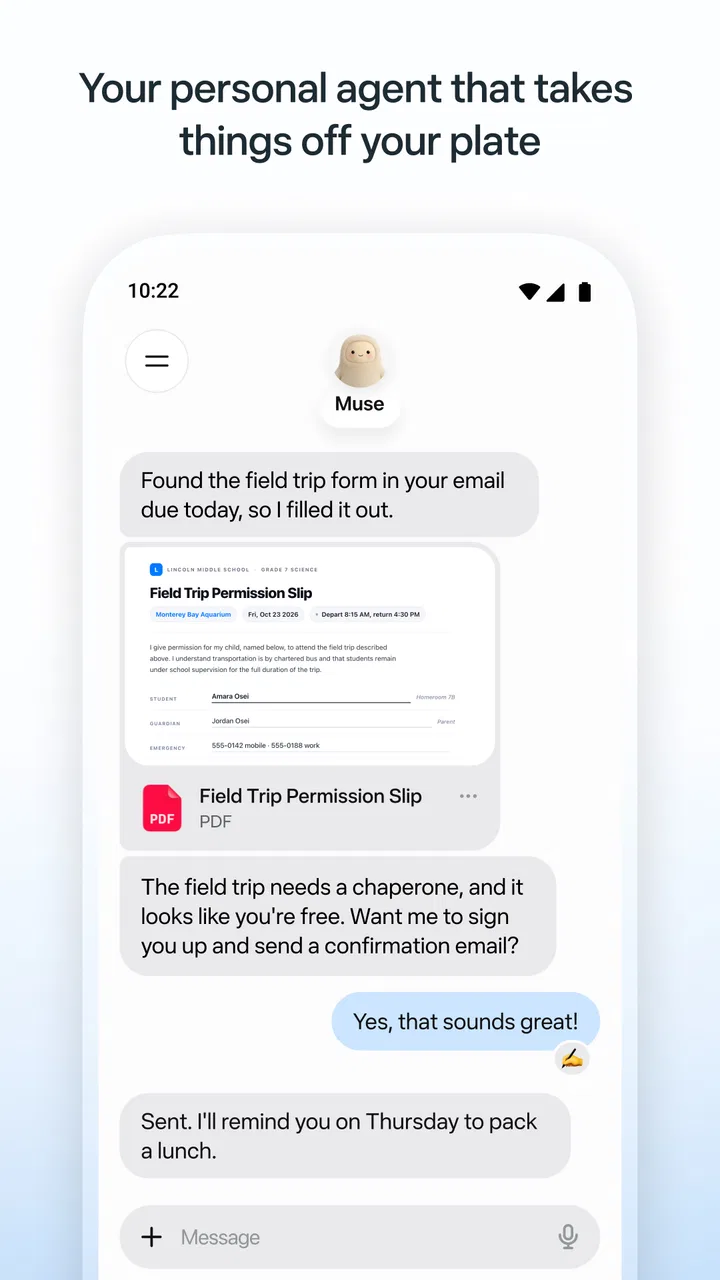
I often lose more time deciding how to begin a small task than doing it: sorting a thought, drafting a reply, or turning a vague intention into a usable next step. Muse is aimed at that kind of everyday friction. It is an AI productivity app from Meta Platforms, Inc., and its appeal is less about replacing a full work system than giving you a place to ask for help when your mind is scattered. My view is that it is most useful when you arrive with a specific, modest problem and want a quick starting point—not when you expect an AI to run your day for you.
When a small task keeps taking too long
The hard part of many routine tasks is not their complexity; it is the switching and setup around them. You open a notes app, stare at an empty page, try to phrase a search, then move to another tool to turn the result into something useful. Muse presents itself as a personal AI agent, so the natural way to approach it is conversationally: explain what you are trying to do and see whether it can help you get unstuck.
That framing matters. A general-purpose assistant can be handy for shaping a first draft, clarifying a question, or organizing a rough idea, but it is not automatically a dependable project manager. I would judge Muse by whether it reduces the number of steps between “I need to do this” and a useful next action. If it gives you a clear draft or plan that you can check and adapt, it can save effort. If you need to verify every detail or repeatedly restate context, the convenience shrinks.
You May Also Like

 AccuWeather: Weather Radar
AccuWeather Review: A Quick, Clear Forecast for Everyday Decisions
For everyday plans, the best forecast is the one you can understand quickly. AccuWeather makes rain timing, radar, and local conditions easy to act on, with a few trade-offs.

 Hill Climb Racing
Why Hill Climb Racing Still Turns Crashes Into One More Run
A tiny car, a bumpy hill and one more upgrade: Hill Climb Racing keeps resurfacing because its simple chaos makes every near-miss feel personal.

 AliExpress - Shopping App
AliExpress Makes Global Shopping Feel Personal, but Shoppers Bear the Risk
AliExpress turns a global marketplace into a pocket-sized discovery engine. Its reach is useful, its shopping loop compelling, and its trade-offs easy to miss.

 Lords Mobile: Kingdom Wars
Lords Mobile Is a Kingdom-Building Routine, Not a Quick Match
A case-by-case verdict on the building, battles, device demands, and social commitments that make Lords Mobile rewarding for some players and exhausting for others.

 PDF Scanner app - TapScanner
TapScanner Makes Paperwork Easier to Capture, Check, and Share
TapScanner makes scanning with a phone feel less like a rescue operation and more like a dependable step in getting work done. Its capture tools are useful, though not flawless.

 Block Blast!
 Shows How Much a Puzzle Game Can Leave Out
A quiet grid game shows why puzzle players increasingly value instant clarity, repeatable skill and low-pressure play—and where the genre still needs to catch up.
More From Our News Desk
View All News


It sits in the productivity category, but I would not treat it as a conventional calendar, task list, or document editor. Those tools are strongest when you need structured records and predictable controls. Muse is better suited to the fuzzy work that happens before those records exist: finding the right wording, breaking down an idea, or asking for a fresh way to approach a task.
A useful first session starts with one real task
My practical advice is to begin with something small and current rather than asking a broad question such as “help me be more productive.” Try a concrete request: explain the situation, say what outcome you need, and mention any constraint that matters. For example, if you have to send a delicate message, describe the relationship and the point you need to communicate, then ask for a concise draft. That gives the conversation a clear target and makes it easier for you to judge whether the result is actually useful.
There is no need to treat an initial answer as finished work. I would use it as raw material: keep the parts that sound right, correct assumptions, and ask for a revision with a specific change. “Make this warmer but still direct” is more actionable than simply asking for something better. This small habit helps keep an AI conversation focused and reduces the back-and-forth that can otherwise erase the time saved.
Another sensible setup choice is deciding what not to share. When asking for help with a work note, replace names or sensitive details with neutral descriptions unless those details are genuinely necessary. That is a good routine with any AI assistant, especially when the task involves other people. The goal is to give Muse enough context to help without turning a simple drafting request into an unnecessary disclosure.
Where it can fit into an ordinary day
Imagine you have a busy morning, a half-formed idea for a meeting, and a message you have been postponing. Instead of switching between a blank note and a search box, you can use a conversation to turn the meeting idea into a short agenda, then work through a first pass at the message. The useful outcome is not that the app has made the decisions for you; it is that you now have something concrete to review. That is a realistic way to save time without handing over judgement.
For planning, I would ask it to divide a broad piece of work into a few manageable steps, then move those steps into whatever task system I already rely on. This is a helpful division of labour: Muse can assist with thinking through a plan, while a dedicated organizer remains the place to track ownership, deadlines, and completion. Keeping those roles separate also makes it easier to notice when a suggestion is too vague to act on.
For writing, the best use is often revision rather than asking for a polished answer from scratch. A rough paragraph, a list of points, or a description of the audience gives the conversation something to work with. You can ask for a clearer structure or a more natural tone, then compare the result with your own intent. I would still check names, facts, commitments, and anything that could affect a working relationship before sending it.
It may also help when you are trying to understand a topic before choosing a next step. Ask for an explanation at the level you need, then follow up on the parts that remain unclear. The trade-off is that a fluent answer can sound more certain than it deserves. If the decision is consequential, use the response to identify what to verify rather than treating it as a final authority.
Less setup, but not less judgement
The main potential time saving is the conversational starting point. In a conventional notes app, you provide the structure and do the organizing yourself; with an AI assistant, you can describe the problem in ordinary language and ask for help shaping it. Compared with a web search, a conversation can be more convenient when you want a draft or a sequence of steps rather than a list of pages to inspect. But those alternatives remain better when you need a durable record, a source you can cite, or precise manual control.
A useful way to avoid wasted effort is to make each request testable. Ask for three options if you genuinely need alternatives, or request a short checklist if you need a sequence. Then decide whether the answer has moved the task forward. Open-ended prompting can be enjoyable, but it can also create more text to sort through. For productivity, a concise answer that leads to an action is usually more valuable than a long conversation that feels busy.
There is also a reliability trade-off. AI-generated wording can be plausible without matching your circumstances, and a plan may omit a constraint you forgot to mention. I would be especially careful with factual claims, schedules, promises, and anything involving money or other people’s expectations. Treat the assistant as a capable collaborator for drafting and organizing—not as a source whose output should bypass your normal checks.
What to expect before relying on it
The app is free to download, with in-app purchases listed from $0.99 to $1,049.00 per item. That wide range is a reason to check the purchase details in the app store before committing to anything; it does not tell me which paid option would suit a particular person. If you only want to try conversational help with everyday tasks, start by exploring the free experience and decide whether it fits your habits before considering an upgrade.
Muse has a 4.7 average from around 115,000 ratings, and it has been installed over 5 million times. Those figures suggest that many people have tried it, but they do not guarantee that its answers will fit your work style. It is rated Teen, so younger users and families should take that age guidance into account. The current version is 13.0.0.4.159, and it requires Android 10 or later.
Because this is an AI tool, the quality of the experience depends partly on how clearly you describe what you need and how carefully you review what comes back. If you prefer a fixed interface with predictable fields, or you need tasks automatically represented in a structured calendar, a dedicated productivity app is likely a better fit. Likewise, if your work depends on traceable sources, use a research-oriented workflow rather than relying on a conversational answer alone.
Who I would recommend it to
I would suggest Muse to someone who regularly gets stuck at the blank-page stage: people drafting routine messages, sorting loose ideas, or breaking a broad goal into smaller actions. It is particularly promising for a person who already has a calendar or task manager and wants help thinking through the work before recording it there. The strongest habit is to use it for a bounded step, take the useful result, and return to the tools where the rest of the work lives.
I would skip it, or keep expectations modest, if you want a reliable source of truth, a fully structured planner, or an assistant that can make decisions without supervision. It may also feel like an unnecessary layer if your existing notes and search habits already get you to a clear answer quickly. Any extra conversation is friction too; the app earns a place only when it removes more effort than it adds.
Developed by Meta Platforms, Inc., Muse has a clear role as a conversational aid for everyday productivity rather than an all-in-one operating system for your work. My recommendation is to test it on one recurring annoyance—an awkward draft, a messy idea, or a task you keep postponing—and judge the result by whether you finish sooner and with less mental overhead. If you want help getting from a vague thought to a workable first step, Muse is worth trying; if you need structure, certainty, or hands-off automation, choose a more specialized tool.
FAQs for Muse from Meta
01What is Muse from Meta?
Muse is Meta’s AI-powered creative app, designed to help users explore ideas and generate or transform visual content through prompts and creative tools. The experience may include features for making images, editing existing creations, and sharing results, depending on the version and region. Muse is different from a conventional photo editor: its capabilities and availability can change as Meta develops the app, so check the current app listing for the precise features offered.
02Is Muse from Meta free to download and use?
Muse may be available to download without an upfront charge, but pricing and access to particular tools can depend on your country, account, and the app version. AI features may also be subject to usage limits or other restrictions. Before installing, review the official Google Play or Apple App Store listing for current pricing, in-app purchases, eligibility requirements, and any limits that could affect how often you can create content.
03How do you create content with Muse from Meta?
Muse is intended to make creative work accessible through an AI-assisted workflow. Depending on the tools available in your version, you may be able to describe an idea in text, select options, and generate or adjust visual results. The exact process and controls can change, so follow the in-app instructions rather than assuming every feature works the same way. Results may vary, and prompts or edits might need refining to match your intentions.
04Is Muse from Meta available on Android and iOS?
Availability can vary by platform, country, and rollout stage, and an app may not appear in every regional store at the same time. Search for Muse by Meta in the official Google Play Store or Apple App Store and verify the developer before downloading. If it is unavailable, the app may not yet be supported in your region or on your device. Avoid unofficial download files, which can pose security risks.
05What should I know about privacy and content created in Muse?
Before using Muse, read its privacy information and the terms presented in the app or on its official store page. As with other AI services, prompts, uploaded material, and generated content may be handled under Meta’s applicable policies, which can vary by feature and location. Do not submit sensitive personal information or images unless you understand how they may be used. Also check permissions and consider whether you have the rights to any material you upload.
Pros
- Voice prompts provide hands-free guidance during meditation.
- Sessions include options for focus and sleep.
- Daily goals help make mindfulness practice more consistent.
- A calm interface makes sessions easy to start.
- Short exercises suit users with limited free time.
Cons
- Many features require a paid subscription.
- Some content is unavailable in certain regions.
- The app may collect personal and usage data.
- A stable internet connection may be needed for some features.
- Meditation guidance may feel too scripted for some users.

Muse from Meta
Gallery